


Katarina
-
Posts
194 -
Joined
-
Last visited
-
Days Won
18
Everything posted by Katarina
-

Evolution scam my 2k$ without clicking anything while join
Katarina replied to takecare3434's topic in Casino Discussion
Hey there @takecare3434. We are sincerely sorry that you have had such an unpleasant experience. However, after you contacted us on Live chat, we further escalated your concern to our Tech team, who took the time to thoroughly look into the matter both internally and raise it with the provider. The result of that investigation were communicated with you in the soonest time possible, within the Live chat conversation so please refer to that. We understand that the outcome did not meet your expectations, and unfortunately we are unable to alter the results. Anyhow, please bear in mind that the update you got was outcome of an extensive investigation. We hope you can understand our position. 🙏 If possible, please remove [Unsolved] from the title since the matter was actually resolved, but just unfortunately not with expected results. Don't hesitate to reach us out at any time on Live Chat or support email ([email protected]) as we are available 24/7. Have a good one! -
Tackle, Gary, Tackle Ends: 21/10/19 @ Midday (12pm) GMT Requirement: Win two consecutive rolls on at least 95x multiplier on Dice (!nonce must be consecutive!) Minimum bet: 0.00000100 0.00003700 0.00004500 0.00015000 3.40000000 0.03000000 Bet must have been made after the commencement of this promotion. 1 valid entry per household. Hidden bets mode must be disabled during the whole duration of the promotion. Do not change your linked account during the whole duration of the promotion. 10+ Post count on the forum. Prize Pool(s): (based on the number of unique players) Minimum prize pool: 0.01 BTC If over 30 participants: 0.03 BTC If over 40 participants: 0.05 BTC If over 50 participants: 0.06 BTC If over 200 participants: 0.08 BTC How to Enter: Respond to this topic, and link your bet ID using the link function in the text editor. (Paste your bet id, then highlight and click on the link bet button, as shown in image below)

-
I recently watched the British TV drama Black Mirror and I loved it! If you are into thriller/sci-fi, check it out: https://www.imdb.com/title/tt2085059/
-
If you want to learn how to do it, just follow the tutorial and give it a try. If you get stuck somewhere and need some assistance, just pm me and I will try to assist you.
- 62 replies
-
- 3
-

-
- fairness
- provably fair
- (and 1 more)
-
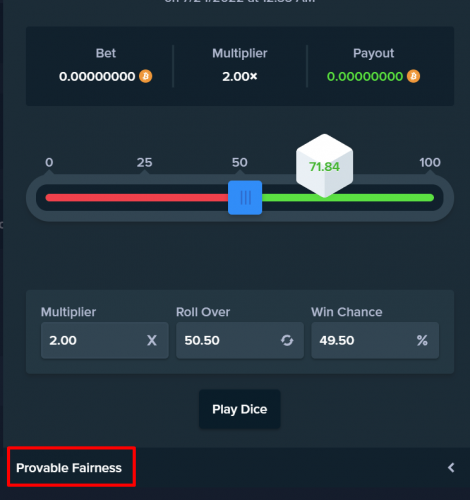
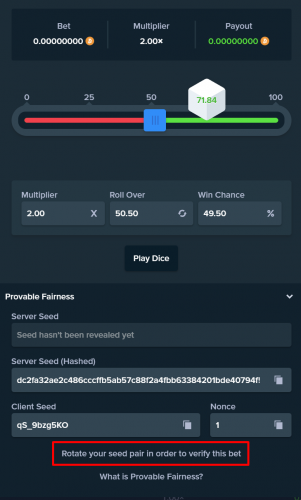
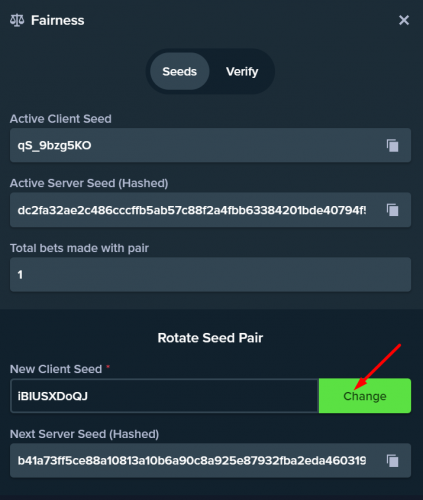
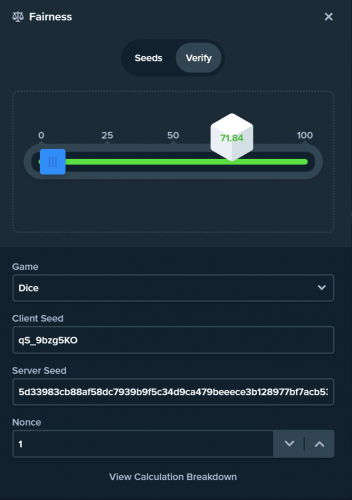
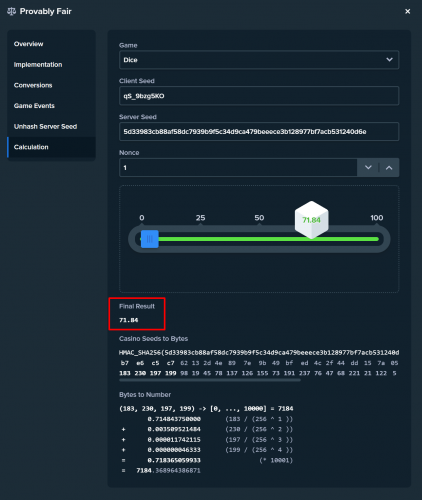
Good day everyone! Stake is the most fair and transparent online casino in the business. Founded by a group of industry veterans with the goal of freeing players from deceptive and shady traditional online casino practices. We vow to provide the first truly fair online gambling experience: https://stake.com/provably-fair/overview In this thread, you will be given a detailed explanation of how to verify your bets using our verification system, but also using an open-source third-party one. How to verify your bets using Stake verification tool: 1. Open a bet and click on "Provable Fairness". 2. After you do so, you will see the bet verification details, but before we proceed to the actual verification, we will need to change/rotate the seed pair! To do so, simply click on "Rotate your seed pair in order to verify this bet". Please note that it is necessary to rotate the seed pair before verification! 3. You will then input the new client seed and click on "Change". If you want the new client seed to be randomly generated, just click on "Change" and you will be given a new random client seed. 4. Now from the bet history open the bet you want to verify and click on "Verify bet". You can find the bet history under Account>Transactions>Bets: https://stake.com/transactions/bets This will lead you to the "Verify" tab where you will be able to see how your bet looks like and what the outcome is. Additionally, you will see there all the bet info you need for a verification on any other verification tool that supports the games we have (game name, client and Server seed, and nonce). *If you want to see the detailed calculation breakdown of that bet, click on "View Calculation Breakdown" and a new tab with further details of the bet will pop up: ** On the following link, you can verify any bet you wish to if you enter the needed data: https://stake.com/provably-fair/calculation Open-Source third-party verification tool: The direct link to the verification tool: https://www.provablyfair.me/casino/stake-verifier/ Follow the above listed steps and then just copy and paste the data into the designated fields. I sincerely hope this was helpful. Should you have any additional questions or doubts, feel free to comment on this thread. Have a lovely day everyone!


- 62 replies
-
- 14
-
-

-
- fairness
- provably fair
- (and 1 more)
-
Hi! Yeah, that was my bad @wilberthh , I apologize. Darko was right, the one on BTT is closed and it will be paid out at the same time as the one here.


